Construction Operations, Connected.
Less time coordinating. More time building.
For Australian construction subcontractors, starting with steel-fixing businesses in Sydney and NSW. We connect your crew scheduling, timesheets, job costs and the tools you already use into one system built around how your business runs, with AI that drafts and suggests while your team decides.
We talk in English or Mongolian. Монгол хэлээр ярилцаж болно.
AI suggestion
Move two fixers from Site B to Site A for Thursday’s pour.
Supervisor
Checked against the planApproved
Crew message
Thursday: Site A, start 6:00am.
Пүрэв гараг: А талбай, 6:00 цагт эхэлнэ.
Where the week goes
Most subcontractors run on calls, group chats, spreadsheets and accounting software. Each one works on its own; the time goes in the gaps between them.
Schedules that live in group chats
Tomorrow’s crews are sorted by phone calls and late-night messages, and a change doesn’t always reach everyone it affects.
Hours entered twice
Timesheets arrive as texts, photos and paper, then get typed up again for payroll and invoices.
Job costs that arrive late
Labour cost per job isn’t clear until the end of the month, when it’s too late to change course.
Tools that don’t talk to each other
The schedule, the spreadsheets and the accounts each hold part of the picture, so the same details are keyed in more than once.
Two languages on every site
Instructions written in English reach crews more at home in Mongolian, and details get lost along the way.
Scheduling, timesheets and job costs, connected
Six parts of one system, chosen for your business. Start with the one that costs you the most time, and add the rest when your team is ready.
Crew scheduling
Plan who works where each day on one shared schedule. Changes reach the crews they affect straight away, and the office, supervisors and crews all see the same plan.Timesheets
Workers record start and finish on their own phone. Supervisors check and approve the hours, and approved hours feed payroll and job costs without retyping.AI assistance
AI drafts crew messages and translations, flags clashes and unusual hours, and suggests who could cover a gap. A supervisor reviews and approves every suggestion before anything is sent or changed.Job costing
Approved hours and each worker’s rate add up to labour cost per job through the week, so you can compare it with the quote while there’s still time to act.Systems integration
Connect the accounting, payroll and project software you already use, where it offers an API or a reliable export. We confirm what’s possible before we quote.English and Mongolian
Crew screens and messages in English and Mongolian. Fixed wording is translated and checked by a fluent speaker, and AI-drafted translations wait for approval before they’re sent.
From the schedule to payroll, without retyping
How scheduling and timesheet data move through a connected system. Each step is built for you or connected to a tool you already use, and people approve at the marked points.
Office
Jobs and sites
Job details come in from your quotes or project software, or the office adds them.
Supervisor
Schedule
Crews are planned for each site. AI can suggest who’s free and flag clashes.
Supervisor approves
Crew
Crew notified
Each worker gets their site and start time on their phone, in English or Mongolian.
Crew
Hours recorded
Workers record start and finish, and anything unusual is flagged for a closer look.
Supervisor approves
System
Job costs
Approved hours and rates become labour cost per job, updated as the week goes.
Office
Payroll and accounts
Approved hours and job codes go to payroll and your accounts, where your software allows.
Office signs off
AI suggests. People approve.
AI drafts crew messages and translations, flags clashes and unusual hours, and suggests who could cover a gap. Its suggestions wait at the approval points: nothing is sent, changed or paid until a person approves it. It doesn't check qualifications or site safety; those stay with your team.
Who sees what
- Crew
- Their own sites, shifts, hours and messages.
- Supervisors
- The sites and crews they run, and the hours waiting for approval.
- Office
- Schedules, costs and rates, limited to the people you choose.
Connect what works. Build what’s missing.
Construction software integration where your tools allow it, and new software where nothing fits. We'll tell you which suits your business, and why.
Custom integration
Connect what you have
When your tools mostly work, we join them up: schedule changes reach crews, approved hours reach payroll, and job codes match your accounts. Your team keeps the software it knows.
- Built on the APIs and exports your tools offer
- Usually a workflow automation project
- What’s possible depends on each tool, and we check before quoting
New software
Build what’s missing
When nothing fits how you work, we build it: scheduling, timesheets and job costing designed around your crews and sites, connected to the tools you keep.
- Designed around your process, and yours to keep
- Usually an internal system project
- Connected to accounting and payroll where they allow it
Most businesses start by connecting one workflow and add more from there. If the smaller option does the job, we’ll recommend it.
Start with one workflow, or connect the lot
Three ways to work together, priced from our published ranges. These are indicative: you get a fixed price after the Discovery Call.
Indicative price
Automate one workflow
One process connected or automated, such as approved timesheets into payroll, or schedule changes sent to crews.
$1,500 to $7,500
1 to 4 weeks
- A map of the workflow as it runs today
- The connection or automation, tested on real data
- Handover and 30 days of support
Indicative price
Connected operations
Scheduling, timesheets and job costing in one system your team works in every day, connected to your accounts.
$6,000 to $18,000
3 to 8 weeks
- Crew screens in English and Mongolian
- Access by role for crews, supervisors and the office
- Built in stages, tried with one crew first
Monthly plan
Ongoing improvement
New connections, refinements and AI features added as your team is ready, within an agreed monthly budget.
From $1,900 a month
Monthly plan, billed in advance
- Priorities planned with you
- Updates as your tools change
- New workflows as the business grows
Indicative ranges in AUD, before GST, from our published prices. Every project is quoted at a fixed price after the Discovery Call, once we’ve seen your tools and processes. Software subscriptions, hosting and AI usage are budgeted separately.
Built for the trade before
We've designed and built crew software for Sydney's steel-fixing trade, in English and Mongolian.
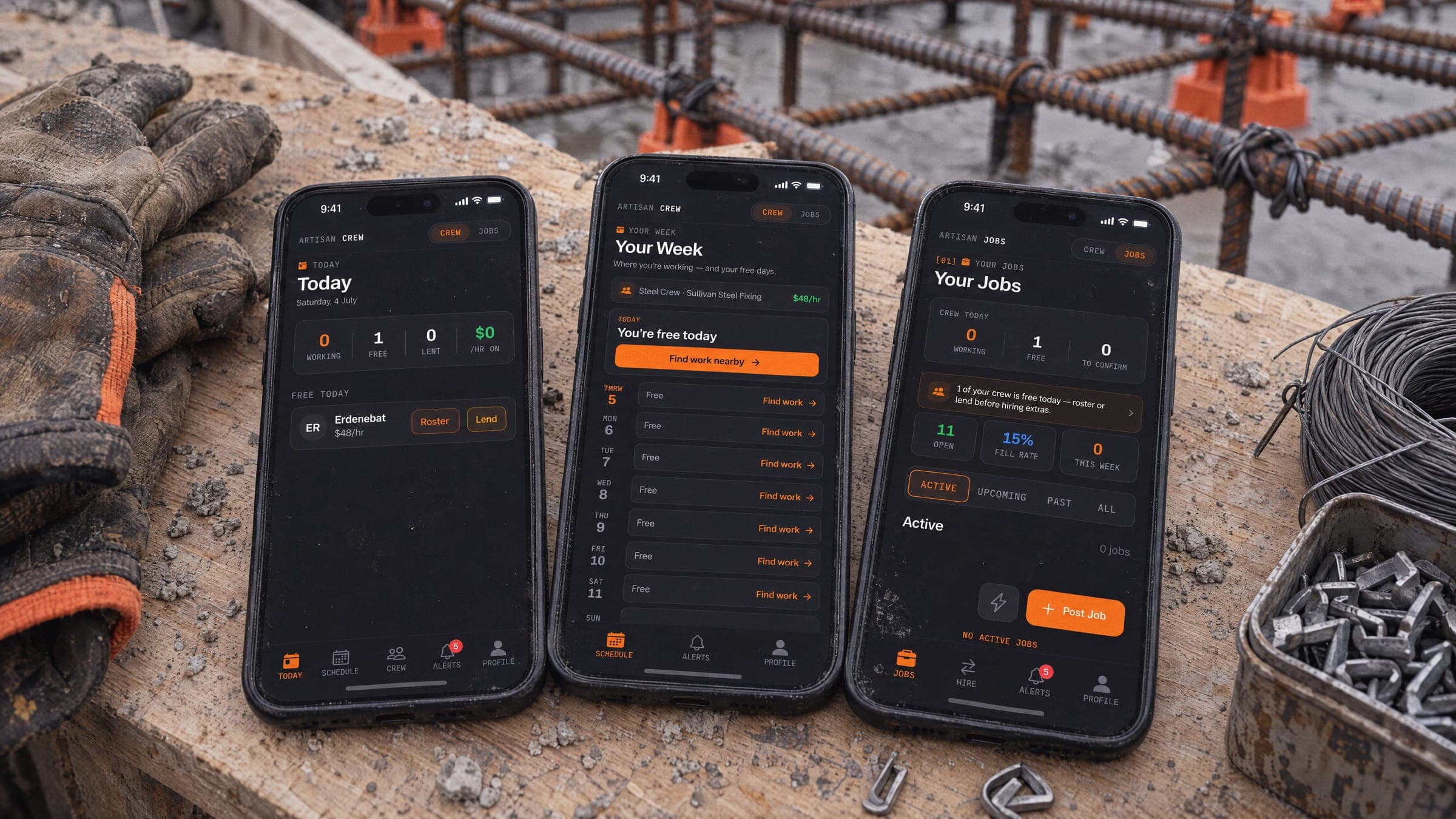
Artisan shows the kind of system we build. Yours is designed for your business, and it’s yours.
Common questions
Implementation, integrations, crews, data and price.
Still have a question?
Tell us how your business runs today and we'll reply within one to two business days, in English or Mongolian.
Ask usConstruction operations
It starts with a free Discovery Call. Then we map how a job moves through your business today: who schedules, how hours are recorded and where costs end up. You get a fixed-price proposal for the first stage. We build in stages, try each one with one crew before rolling it out, and train the office and supervisors as we go.
Often, but it depends on the software. Where a tool offers an API or a reliable export, we can connect to it. Where it doesn’t, we’ll suggest a workaround, such as a scheduled export and import. We confirm what’s technically possible before quoting. Craefto Works isn’t partnered with or endorsed by any accounting or construction software provider.
Crew screens stick to the few things a worker needs: today’s site, start and finish, and messages, in English or Mongolian, on the phone they already carry. We test the screens with your crews and change what doesn’t work for them. It also needs supervisors who use it every day, so we plan the rollout with them.
AI drafts and suggests: crew messages and translations, schedule clashes, hours that look unusual, and who could cover a gap. Nothing is sent, changed or paid until a person approves it, and AI features can be switched off.
It can store the tickets and licences your team records, show them on the schedule and remind you before they expire. It doesn’t verify qualifications or decide whether work is safe: those checks stay with your team and your safety processes.
Access is set by role: workers see their own shifts and hours, supervisors see their sites, and only the people you choose see rates and costs. Data is encrypted in transit and at rest, kept in Australian data centres where the services allow it, and handled in a way that supports your obligations under the Privacy Act. The data is yours, and you can export it.
Connecting or automating one workflow usually costs $1,500 to $7,500, and a connected system with scheduling, timesheets and job costing $6,000 to $18,000, in AUD before GST. These ranges are indicative: you get a fixed price after the Discovery Call. Ongoing improvements and support are available on a monthly plan from $1,900 a month. Software subscriptions, hosting and AI usage are budgeted separately.
No. It isn’t an off-the-shelf product or a subscription to our software. We connect your tools or build a system for your business, and what we make is yours.
We’re starting with steel-fixing businesses in Sydney and NSW, the trade our work on Artisan grew out of. The same approach suits other subcontractors, such as formwork, concreting and scaffolding, and we’re happy to talk.
Tell us how your operations run
Start with the bottleneck that costs you the most time. You don't need a finished brief.